2018-05-28
Video on Android
Before I started working on the app Device Video Maker I haven't used much of Android's media api. That app let's you capture the screen and create a nice video with the screen capture rendered into a device frame together with custom text.
I was surprised that quite few articles are there on the web. I think the api documentation is pretty good but to be honest I had overseen a lot of details from there and I had to learn things the hard way.
E.g. that CSD thing puzzled me a lot and the errors you will see in your logs when you do something wrong are very confusing and cryptic. That's a bad experience when developing such an app.
One of the best resources (beside the api documentation - you should read that carefully) is Big Flake - it helped me a lot. It's not that easy to understand everything since it references mainly CTS code and code that at least looks like CTS code. But it should definitely be your second stop after the api docs.

2018-03-10
Trying to generate downloads in an overcrowded category
We all know the gold rush in app stores is over.
I just decided to see if it's still possible to generate some downloads in an overcrowded category.
I looked for something that is really easy to implement, has much competition and the competitors feature high volume downloads: Crazy-Text
It's really simple - yes. But that's the point.
I document everything I do in a spreadsheet and I am going to write down and publish the findings.
There are almost no downloads yet - so it's an experiment. Let's see what will happen to this tiny app.
I just decided to see if it's still possible to generate some downloads in an overcrowded category.
I looked for something that is really easy to implement, has much competition and the competitors feature high volume downloads: Crazy-Text
It's really simple - yes. But that's the point.
I document everything I do in a spreadsheet and I am going to write down and publish the findings.
There are almost no downloads yet - so it's an experiment. Let's see what will happen to this tiny app.
2013-10-14
Script for doing a backup of an Android app and unpacking it
Recent Android versions added the ability to create backups via "adb backup". I use this during development if I want to look inside the database files (and other files written to the app's private directories).
Quite useful. Obviously you shouldn't encrypt the backup :)
Quite useful. Obviously you shouldn't encrypt the backup :)
Creating a System Overlay (Always on Top over all Apps) in Android
I don't think this is something I want to see overused by apps but I guess there are some very cool things possible with this.
I have already seen apps using this concept in a good way and I already have ideas what to do with this (once I get enough spare time).
The code is based on the solution outlined at http://stackoverflow.com/questions/4481226/creating-a-system-overlay-always-on-top-button-in-android but this one also adds support for moving the view around by dragging it.
I have already seen apps using this concept in a good way and I already have ideas what to do with this (once I get enough spare time).
The code is based on the solution outlined at http://stackoverflow.com/questions/4481226/creating-a-system-overlay-always-on-top-button-in-android but this one also adds support for moving the view around by dragging it.
A fluent API for ContentResolver#query
One thing that always felt ugly was using ContentResolver#query. A line like this isn't very readable and changing the query often introduce new bugs:
c = getContentResolver().query(Contacts.CONTENT_URI, new String[]{Contacts._ID,Contacts.DISPLAY_NAME}, "("+Contacts.HAS_PHONE_NUMBER+"=? AND "+Contacts.STARRED+"=?) OR ("+Contacts.HAS_PHONE_NUMBER+"=? AND "+Contacts.STARRED+"<>?)", new String[]{"1","0","1","0"}, Contacts.DISPLAY_NAME);
So I thought it would be nice if you could write this query like this:
c = Query.create().select(Contacts._ID,Contacts.DISPLAY_NAME).
where( Query.create().
where(Contacts.HAS_PHONE_NUMBER).eq("1").
and().where(Contacts.STARRED).eq("0")
).or().
where( Query.create().
where(Contacts.HAS_PHONE_NUMBER).eq("1").
and().where(Contacts.STARRED).ne("0")
).
orderBy(Contacts.DISPLAY_NAME).
build().execute(getContentResolver(), Contacts.CONTENT_URI);
c = Query.create().select(Contacts._ID,Contacts.DISPLAY_NAME).
where( Query.create().
where(Contacts.HAS_PHONE_NUMBER).eq("1").
and().where(Contacts.STARRED).eq("0")
).or().
where( Query.create().
where(Contacts.HAS_PHONE_NUMBER).eq("1").
and().where(Contacts.STARRED).ne("0")
).
orderBy(Contacts.DISPLAY_NAME).
build().execute(getContentResolver(), Contacts.CONTENT_URI);
IMHO this is easier to read, easier to understand and easier to maintain. So I did a quick proof of concept and it turned out to be pretty easy.
2013-06-20
Pull to Reveal Additional Options
Recently I have seen some screen designs for an Android app where the user can pull a listview to reveal additional options e.g. sort options or something like that. So I started to think about a possible approach for this.
It's not fully polished code but just a quick prove of concept. And it's also not possible currently to hide the additional views easily by e.g. overscrolling to the end of the list (in my example I have a button that calls the collape method). But all this can be added easily.
A possible layout file could look like this
The important things here are the IDs header and myList (which are not wisely choosen I have to admit).
Wth this idea also things like the Pull-To-Refresh as seen in the latest GMail for Android version are now very easy to implement.
Header views are not what we want so I thought about inheriting from ListView and add the functionality but aber a look at the source I thought there must be an easier solution to this.
So my solution was to create a subclass of LinearLayout which intercepts touch events. There are two children. A container for the additional options at the top and the ListView of cause.
And this turned out to be an easy and nice solution IMHO.
Here is the source of that touch interception LinearLayout:
 package de.mobilej.widget;
 import android.content.Context;
 import android.os.Bundle;
 import android.os.Parcelable;
 import android.util.AttributeSet;
 import android.view.MotionEvent;
 import android.view.MotionEvent.PointerCoords;
 import android.view.View;
 import android.view.animation.OvershootInterpolator;
 import android.widget.LinearLayout;
 import android.widget.ListView;
 import de.mobilej.listboxtest.R;
 public class TopDrawer extends LinearLayout {
   private boolean headerVisible;
   private ListView lv;
   private int originalLvBottom;
   PointerCoords pointerMoveStart = new PointerCoords();
   boolean scrolling = false;
   private View v;
   public TopDrawer(Context context) {
     super(context);
   }
   public TopDrawer(Context context, AttributeSet attrs) {
     super(context, attrs);
   }
   public TopDrawer(Context context, AttributeSet attrs, int defStyle) {
     super(context, attrs, defStyle);
   }
   @Override
   protected void onLayout(boolean changed, int l, int t, int r, int b) {
     super.onLayout(changed, l, t, r, b);
     if (v == null) {
       v = findViewById(R.id.header);
       lv = (ListView) findViewById(R.id.mylist);
     }
     originalLvBottom = lv.getBottom();
     if (!headerVisible) {
       v.setTranslationY(-1 * v.getHeight());
       lv.setTranslationY(-1 * v.getHeight());
       lv.setBottom(originalLvBottom + v.getHeight());
     }
   }
   public void colapse() {
     headerVisible = false;
     lv.setBottom(originalLvBottom + v.getHeight());
     float curTrans = v.getTranslationY();
     float destTrans = -1 * v.getHeight();
     if (curTrans > destTrans) {
       v.animate().translationY(destTrans).setDuration(300).setInterpolator(new OvershootInterpolator()).start();
       lv.animate().translationY(destTrans).setDuration(300).setInterpolator(new OvershootInterpolator()).start();
     }
   }
   @Override
   public boolean onInterceptTouchEvent(MotionEvent ev) {
     int action = ev.getActionMasked();
     if (action == MotionEvent.ACTION_DOWN) {
       scrolling = true;
       ev.getPointerCoords(0, pointerMoveStart);
     } else if (action == MotionEvent.ACTION_MOVE && scrolling) {
       PointerCoords currentPos = new PointerCoords();
       ev.getPointerCoords(0, currentPos);
       if (pointerMoveStart.y - currentPos.y < 0) {
         if (lv.getFirstVisiblePosition() == 0) {
           View topChild = lv.getChildAt(0);
           if (topChild.getY() == 0) {
             return true;
           }
         }
       }
     }
     return false;
   }
   @Override
   public boolean onTouchEvent(MotionEvent ev) {
     int action = ev.getActionMasked();
     if (action == MotionEvent.ACTION_MOVE && scrolling && !headerVisible) {
       PointerCoords currentPos = new PointerCoords();
       ev.getPointerCoords(0, currentPos);
       if (pointerMoveStart.y - currentPos.y < 0) {
         if (lv.getFirstVisiblePosition() == 0) {
           View topChild = lv.getChildAt(0);
           if (topChild.getY() == 0) {
             int hHeader = v.getHeight();
             int moved = (int) (currentPos.y - pointerMoveStart.y);
             int trans = -hHeader + moved;
             if (trans > 0) {
               trans = 0;
               headerVisible = true;
             }
             v.setTranslationY(trans);
             lv.setTranslationY(trans);
             lv.setBottom(originalLvBottom - trans);
             return true;
           }
         }
       }
     } else if (action == MotionEvent.ACTION_UP) {
       scrolling = false;
       if (!headerVisible) {
         lv.setBottom(originalLvBottom + v.getHeight());
         float curTrans = v.getTranslationY();
         float destTrans = -1 * v.getHeight();
         if (curTrans > destTrans) {
           v.animate().translationY(destTrans).setDuration(300).setInterpolator(new OvershootInterpolator())
               .start();
           lv.animate().translationY(destTrans).setDuration(300).setInterpolator(new OvershootInterpolator())
               .start();
         }
       }
     }
     return false;
   }
   @Override
   protected void onRestoreInstanceState(Parcelable state) {
     Bundle b = (Bundle) state;
     if (b == null) {
       return;
     }
     super.onRestoreInstanceState(b.getParcelable("SUPER"));
     headerVisible = b.getBoolean("visible");
   }
   @Override
   protected Parcelable onSaveInstanceState() {
     Bundle b = new Bundle();
     b.putParcelable("SUPER", super.onSaveInstanceState());
     b.putBoolean("visible", headerVisible);
     return b;
   }
 }
It's not fully polished code but just a quick prove of concept. And it's also not possible currently to hide the additional views easily by e.g. overscrolling to the end of the list (in my example I have a button that calls the collape method). But all this can be added easily.
A possible layout file could look like this
 <LinearLayout xmlns:android="http://schemas.android.com/apk/res/android"
   xmlns:tools="http://schemas.android.com/tools"
   android:layout_width="match_parent"
   android:layout_height="match_parent"
   android:orientation="vertical"
   android:paddingBottom="@dimen/activity_vertical_margin"
   android:paddingLeft="@dimen/activity_horizontal_margin"
   android:paddingRight="@dimen/activity_horizontal_margin"
   android:paddingTop="@dimen/activity_vertical_margin"
   tools:context=".MainActivity" >
   <TextView
     android:id="@+id/textView1"
     android:layout_width="wrap_content"
     android:layout_height="wrap_content"
     android:text="@string/hello_world" />
   <de.mobilej.widget.TopDrawer
     android:id="@+id/topDrawer"
     android:layout_width="match_parent"
     android:layout_height="wrap_content"
     android:orientation="vertical" >
     <LinearLayout
       android:id="@+id/header"
       android:layout_width="match_parent"
       android:layout_height="wrap_content"
       android:orientation="horizontal" >
       <EditText
         android:id="@+id/myEditText"
         android:layout_width="0dp"
         android:layout_height="wrap_content"
         android:layout_weight="1" />
       <ImageButton
         android:id="@+id/button"
         android:layout_width="wrap_content"
         android:layout_height="wrap_content"
         android:src="@android:drawable/btn_star" />
     </LinearLayout>
     <ListView
       android:id="@+id/mylist"
       android:layout_width="match_parent"
       android:layout_height="wrap_content"
       android:layout_alignParentLeft="true"
       android:layout_below="@+id/textView1"
       android:layout_marginTop="26dp" >
     </ListView>
   </de.mobilej.widget.TopDrawer>
 </LinearLayout>
The important things here are the IDs header and myList (which are not wisely choosen I have to admit).
Wth this idea also things like the Pull-To-Refresh as seen in the latest GMail for Android version are now very easy to implement.
2013-05-03
Continuations for Android
In simple words using "Continuations" mean you can pause the execution of code and restart at the same point later with all local variables. (You can think of it as "freezing" the stack)
While you can use threads and locks for a similar behavior but you can even persist a continuation and reload it later. While this is not something you need every day it can come handy sometimes.
While other programming languages have built in support for something like this it is not a standard feature of Java.
However there is a small and nice Apache project making this possible with Java:
http://commons.apache.org/sandbox/javaflow/
It comes with an Ant task to do byte code manipulation and a small runtime (one or two classes). Really nice!
I wondered if this could work on Android, too. (Ok - there is no reason why not but I wanted to give it a try)
YES! IT WORKS!
One thing that one should be aware of is that you really need byte code transformation done by an Ant task. While it's no problem to extend Android's ant builds we all need to run code right from Eclipse.
Fortunately there is a simple solution to this: Just create an Ant script doing whatever is needed and add a new "Builder" between "Java Builder" and "Android Package Builder". That's it!
While you can use threads and locks for a similar behavior but you can even persist a continuation and reload it later. While this is not something you need every day it can come handy sometimes.
While other programming languages have built in support for something like this it is not a standard feature of Java.
However there is a small and nice Apache project making this possible with Java:
http://commons.apache.org/sandbox/javaflow/
It comes with an Ant task to do byte code manipulation and a small runtime (one or two classes). Really nice!
I wondered if this could work on Android, too. (Ok - there is no reason why not but I wanted to give it a try)
YES! IT WORKS!
One thing that one should be aware of is that you really need byte code transformation done by an Ant task. While it's no problem to extend Android's ant builds we all need to run code right from Eclipse.
Fortunately there is a simple solution to this: Just create an Ant script doing whatever is needed and add a new "Builder" between "Java Builder" and "Android Package Builder". That's it!
Rethinking Android Unit Testing
After using Robolectric for a while I was looking for a different approach to do unit testing for Android.
While Robolectric met a lot of my requirements I had the need for a powerful mocking framework and decided to use PowerMock(ito). It's a really powerful framework but I wasn't able to use it together with Robolectric since both do a lot of classloader and byte code transformation magic.
So I decided to just run the test with "android.jar" from the SDK on the classpath and forget about Robolectric but instead mock the platform API calls with PowerMock(ito).
Unfortunately it turned out that this wasn't as easy as it sounds. So I decided to use Javassist to do some byte code manipulation to the android.jar before using it for unit testing. The problem with the original android.jar was that each and every method throws a "Sub"-runtime exception and PowerMock(ito) wasn't able to mock super-calls. (imagine an activity as the class-under-test which must call super.onCreate() in it's onCreate() implementation. Since it's not possible to mock the super.onCreate() you are out of luck)
This approach turned out to be the silver bullet of In-JVM Android unit testing for me.
Thanks to Javassist the transformation of the android.jar was a simple task and now I'm able to use the full potential of PowerMock(ito) to test Android code in Eclipse and during CI builds - including code coverage and all the other fancy stuff.
While Robolectric met a lot of my requirements I had the need for a powerful mocking framework and decided to use PowerMock(ito). It's a really powerful framework but I wasn't able to use it together with Robolectric since both do a lot of classloader and byte code transformation magic.
So I decided to just run the test with "android.jar" from the SDK on the classpath and forget about Robolectric but instead mock the platform API calls with PowerMock(ito).
Unfortunately it turned out that this wasn't as easy as it sounds. So I decided to use Javassist to do some byte code manipulation to the android.jar before using it for unit testing. The problem with the original android.jar was that each and every method throws a "Sub"-runtime exception and PowerMock(ito) wasn't able to mock super-calls. (imagine an activity as the class-under-test which must call super.onCreate() in it's onCreate() implementation. Since it's not possible to mock the super.onCreate() you are out of luck)
This approach turned out to be the silver bullet of In-JVM Android unit testing for me.
Thanks to Javassist the transformation of the android.jar was a simple task and now I'm able to use the full potential of PowerMock(ito) to test Android code in Eclipse and during CI builds - including code coverage and all the other fancy stuff.
2011-07-08
A Weird Problem using View#setTag(int,Object)
Recently we had a problem with OutOfMemory exceptions in one of our Android projects.
The cause of the problem was that we started using View#setTag(int,Objec) and it wasn't very obvious why this problem happend.
After looking at the source code of View it turned out that the indexed tags are stored in
private static WeakHashMap
Where the key is the view itself and the value are the indexed values. While I have no idea what has caused this design choice it doesn't seem to be a big problem. BUT we stored ViewHolder like structures in it which indirectly referenced the view itself!
Because of this the key was never removed by the GC because it was still referenced by the value. To understand the issue you have to know the implementation details of View - otherwise you are absolutely lost and there is no hint found in the docs.
I hope I will always remember that using View#setTag(int,Object) is a tricky thing and I hope I will never ever store a reference to the view itself as a value.
The cause of the problem was that we started using View#setTag(int,Objec) and it wasn't very obvious why this problem happend.
After looking at the source code of View it turned out that the indexed tags are stored in
private static WeakHashMap
Where the key is the view itself and the value are the indexed values. While I have no idea what has caused this design choice it doesn't seem to be a big problem. BUT we stored ViewHolder like structures in it which indirectly referenced the view itself!
Because of this the key was never removed by the GC because it was still referenced by the value. To understand the issue you have to know the implementation details of View - otherwise you are absolutely lost and there is no hint found in the docs.
I hope I will always remember that using View#setTag(int,Object) is a tricky thing and I hope I will never ever store a reference to the view itself as a value.
2011-06-20
The Out of Memory Monster
Recently I had a lot of trouble with an Android app because of a memory leak. In the end Eclipse's MAT was very helpful. While the automatic leak detection brought up a lot of false suspects it turned out that the OQL query "select * from instanceof android.app.Activity" was the right solution. (I guess 99% of all leaks inside Android apps are leaking activities.)
It turned out that somewhere in the code I had two inner classes which should be static with a WeakReference to the activity. One class inherited from Handler and one was a ServiceConnection. (And I was very surprised because of the later, but http://code.google.com/p/android/issues/detail?id=6426 was very helpful.)
It turned out that somewhere in the code I had two inner classes which should be static with a WeakReference to the activity. One class inherited from Handler and one was a ServiceConnection. (And I was very surprised because of the later, but http://code.google.com/p/android/issues/detail?id=6426 was very helpful.)
2011-05-20
yUML looks promising
I just discovered yUML and it looks quite promising. The idea of completely self-contained URLs describing the diagram is briliant and should work for small diagrams that can be used in JavaDoc, a blog or a bugtracker.
Additionally I found yumlec because I already thought about creating something like this my own. Sweet.
Here is an example of that it can do:
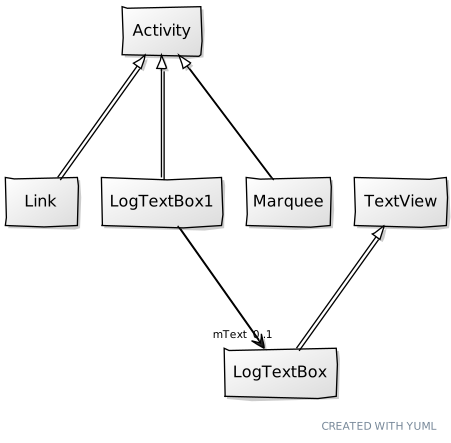
Additionally I found yumlec because I already thought about creating something like this my own. Sweet.
Here is an example of that it can do:
2011-03-10
TDD and Android
I really like TDD and I really love Android but in the past I had some trouble bringing both together.
While Android has nice support for running unit tests on device (or emulator) this isn't really an option for doing TDD since the turnaround times are quite too high. And it's also no fun for the CI server to bring up emulator instances on every build.
Now I stumbled upon Robolectric. I haven't had a chance to give it a try but if it's half as nice as it seems then it's really everything I ever dreamed of. (in terms of Android TDD developement ...)
I'm very curious and keen to give it a try.
While Android has nice support for running unit tests on device (or emulator) this isn't really an option for doing TDD since the turnaround times are quite too high. And it's also no fun for the CI server to bring up emulator instances on every build.
Now I stumbled upon Robolectric. I haven't had a chance to give it a try but if it's half as nice as it seems then it's really everything I ever dreamed of. (in terms of Android TDD developement ...)
I'm very curious and keen to give it a try.
2011-02-24
Android's Main Thread
Android's main thread is the the most important thread for your Android app. Not only the UI stuff is done on the main thread but also your services and much more is running on the main thread.
It's really important not to block the main thread longer than it's absolutely needed. It's always a good idea to not access the network and the filesystem on the main thread. Because of that the nice guys at Google brought us the StrictMode in Android 2.3 to see if your app does IO on the main thread.
But it's also a bad idea to do anything else that is time consuming on the main thread e.g. when handling the onClick of a button or something similar. You can easily spot those long running tasks on the main thread by using the following code. You should run it as early as possible in your application (Application#onCreate is a good place) and you should consider removing it from release builds:
It's really important not to block the main thread longer than it's absolutely needed. It's always a good idea to not access the network and the filesystem on the main thread. Because of that the nice guys at Google brought us the StrictMode in Android 2.3 to see if your app does IO on the main thread.
But it's also a bad idea to do anything else that is time consuming on the main thread e.g. when handling the onClick of a button or something similar. You can easily spot those long running tasks on the main thread by using the following code. You should run it as early as possible in your application (Application#onCreate is a good place) and you should consider removing it from release builds:
Looper.getMainLooper().
long time = -1;
String info = null;
@Override
public void println(String line) {
if(line.startsWith(">>>")) {
time = System.currentTimeMillis();
info = line;
} else {
long now = System.currentTimeMillis();
if(now-time>500) {
Log.d(TAG,"!!!!!!!!!!!! Too slow:"+info);
}
}
}
});
With this code you will see a log entry every time you are doing anything on the main thread that takes more than 500 miliseconds. One nice thing about this approach is that it doesn't need one of the newer Android versions (all it uses is API Level 1!).
2010-07-23
Now I also have to complain about the Android Market
Until today I was really happy with the Android Market. But until now I just was a user of the Android Market. But what happened?
Today I opened a developer account for the Android Market. My plan was to offer a small little app in two versions: Free and paid. It's quite common in the Android Market and I have seen something like this many times in the Market.
I really wished that the Market had something similar to Handango where you can upload a free "demo" version and the "full version" that a paying customer gets together. Unfortunately this isn't possible!
And even worse: You even cannot have two apps that use the same name space. (the package attribute of the Manifest file). That means you cannot easily create a free and a paid version from the same code base.
There are already some ideas how to work around this but all of them are less than ideal.
See http://stackoverflow.com/questions/1222302/android-multiple-custom-versions-of-the-same-app and http://droidin.net/2009/05/13/android-multiapp/ for more about that.
Today I opened a developer account for the Android Market. My plan was to offer a small little app in two versions: Free and paid. It's quite common in the Android Market and I have seen something like this many times in the Market.
I really wished that the Market had something similar to Handango where you can upload a free "demo" version and the "full version" that a paying customer gets together. Unfortunately this isn't possible!
And even worse: You even cannot have two apps that use the same name space. (the package attribute of the Manifest file). That means you cannot easily create a free and a paid version from the same code base.
There are already some ideas how to work around this but all of them are less than ideal.
See http://stackoverflow.com/questions/1222302/android-multiple-custom-versions-of-the-same-app and http://droidin.net/2009/05/13/android-multiapp/ for more about that.
2010-07-19
Design Pattern Oriented Design is a Bad Thing!
Recently I stumbled upon a post on dzone.com: When Design Patterns are Evil and I couldn't agree more.
We all know design patterns and we love them. They make it easier to talk about the design of our code and that's what I think they are good for.
But occasionally I had the joy of maintaining code that seemed to be build around design patterns completely. At first I was impressed (when reading the design documents). But when digging deeper into the code it became more and more obvious that thinking in patterns is a bad idea.
A pattern in my eyes is just a name for something that a good programmer should come up with when solving a particular problem even if he didn't knew about that pattern before. I often had this situation: Solving a problem by writing code and later recognizing that I used a specific pattern.
But trying to throw patterns on every problem you encounter will result in over complicated, bloated and over engineered code.
We all know design patterns and we love them. They make it easier to talk about the design of our code and that's what I think they are good for.
But occasionally I had the joy of maintaining code that seemed to be build around design patterns completely. At first I was impressed (when reading the design documents). But when digging deeper into the code it became more and more obvious that thinking in patterns is a bad idea.
A pattern in my eyes is just a name for something that a good programmer should come up with when solving a particular problem even if he didn't knew about that pattern before. I often had this situation: Solving a problem by writing code and later recognizing that I used a specific pattern.
But trying to throw patterns on every problem you encounter will result in over complicated, bloated and over engineered code.
Maybe it's some sort of uncertainty that leads developers to over use design patterns. They think: If I can refer to a pattern it can't be wrong.
Don't get me wrong: Design patterns are not a bad thing but over using them can be dangerous. As everything in life it's all about balance.
2010-05-29
Are Code Reviews just a waste of Time?
During the last 15 years I worked for a few different organisations of different sizes.
Some of them had more or less formal code reviews as part of their software development process. In my current job for example we have a very rigid code review process that says that every bit of code should get reviewed. But why?
I guess code reviews are considered as a way to improve code quality. It's believed to have a learning effect for less experienced developers as they have to review other's code and their code is reviewed and they should get valuable feedback on their code.
That's all nice in theory but my experience is different.
In a real world project it's unlikely that you have enough understanding of other parts of the code to do really useful code reviews. (I know collective code ownership is something that we should try to aspire for but again - I have still to see that.)
So most code reviews end up with advises like: add some JavaDoc there, don't forget to cleanup imports and format the code (Yes. I know what save actions are for. Thank you!)
All of this stuff (and much more) can be done easily by PMD, FindBugs and CheckStyle. Done properly by an continuous integration server it's automatic and easy. Additionally it's much easier to accept feedback like this from an automatic system than it's to accept from the JavaDoc Nazi next door.
The saved time can be invested into stuff that really improves the code. You could start to do pair programming for at least the important modules. That's really something that creates collective code ownership and makes it possible to have more than one person that really know what's going on inside these core parts. Additionally less experienced developer can learn from the other's and the experienced developers learn how the other's think and code.
But I'm still trying to get this into the heads of my coworkers and managers.
Some of them had more or less formal code reviews as part of their software development process. In my current job for example we have a very rigid code review process that says that every bit of code should get reviewed. But why?
I guess code reviews are considered as a way to improve code quality. It's believed to have a learning effect for less experienced developers as they have to review other's code and their code is reviewed and they should get valuable feedback on their code.
That's all nice in theory but my experience is different.
In a real world project it's unlikely that you have enough understanding of other parts of the code to do really useful code reviews. (I know collective code ownership is something that we should try to aspire for but again - I have still to see that.)
So most code reviews end up with advises like: add some JavaDoc there, don't forget to cleanup imports and format the code (Yes. I know what save actions are for. Thank you!)
All of this stuff (and much more) can be done easily by PMD, FindBugs and CheckStyle. Done properly by an continuous integration server it's automatic and easy. Additionally it's much easier to accept feedback like this from an automatic system than it's to accept from the JavaDoc Nazi next door.
The saved time can be invested into stuff that really improves the code. You could start to do pair programming for at least the important modules. That's really something that creates collective code ownership and makes it possible to have more than one person that really know what's going on inside these core parts. Additionally less experienced developer can learn from the other's and the experienced developers learn how the other's think and code.
But I'm still trying to get this into the heads of my coworkers and managers.
2010-05-08
My two favorite programming related books
There are a lot of programming related books available. Some are good, some are - well - not so good.
But there are two books that I really, really like.
The first one (my number one) is "Clean Code: A Handbook of Agile Software Craftsmanship".
There was nothing totally new in there for me but I personally agree with 99% of everything the author says. It's not a book that teaches you how to write code but it tells you how to write good code. My favorite statement is that software development is a craft, not a science and that's what I ever believed. The only problem was that it seemed that nobody else was thinking the same. But fortunately the craftsmanship thing is now quite popular and we all know by now that we should be proud of being a good craftsman. There clearly is a demand for computer science but software development is something totally different. So in my opinion: "software development != computer science". And this book helps you to become a good craftsman.
The other book is "Code Complete: A Practical Handbook of Software Construction".
I think it's much more low level than the other book. If "Clean Code" is about writing good code this book is just about writing code that actually works. It's a lot of stuff that everyone should already know but I think it's good to have a book like this. While you are reading the book you always think "Hey, I recall this one".
2010-04-26
Experiencing an API bug the hard way
We (my wife, my daughter and I) enjoy Geocaching a lot. It's no surprise that I am using my own (Android) application for that. It's far from complete and it's just for my personal use but last weekend we wanted to show our neighbors how much fun geocaching is and I started to enter the first coordinate into my app and .... got an error.
I entered a valid coordinate like "7:59,149" and the app told me it's invalid.
What happened?
The class android.location.Location#convert(String) is buggy. It's not a big thing but it's really annoying. In the end I just copied the method from the Android sources into my own class and changed the validation condition. So my app is working again.
But learning about this bug this way I will always remember it. (It was so embarrassing!)
I entered a valid coordinate like "7:59,149" and the app told me it's invalid.
What happened?
The class android.location.Location#convert(String) is buggy. It's not a big thing but it's really annoying. In the end I just copied the method from the Android sources into my own class and changed the validation condition. So my app is working again.
But learning about this bug this way I will always remember it. (It was so embarrassing!)
2010-01-31
Viewing DZone on the Android Browser
I really like my new job I started in January 2010 but the way to work takes a lot of time. I travel by train so I can use my G1 to surf the web and do stuff like that so the time isn't completly wasted.
One of the websites I really want to read is DZone.com. Unfortunately it doesn't look good on mobile browsers.
So I hacked a simple iframe to make it work (at least a little bit better) on my Android phone.
To access DZone from the mobile browser just open this link in your mobile browser:
http://www.mobile-j.de/dzone.html
It's not perfect but better than nothing. It might also work on other mobile browser but I haven't tested this.
One of the websites I really want to read is DZone.com. Unfortunately it doesn't look good on mobile browsers.
So I hacked a simple iframe to make it work (at least a little bit better) on my Android phone.
To access DZone from the mobile browser just open this link in your mobile browser:
http://www.mobile-j.de/dzone.html
It's not perfect but better than nothing. It might also work on other mobile browser but I haven't tested this.
Subscribe to:
Posts (Atom)

 Posts
Posts

