In simple words using "Continuations" mean you can pause the execution of code and restart at the same point later with all local variables. (You can think of it as "freezing" the stack)
While you can use threads and locks for a similar behavior but you can even persist a continuation and reload it later. While this is not something you need every day it can come handy sometimes.
While other programming languages have built in support for something like this it is not a standard feature of Java.
However there is a small and nice Apache project making this possible with Java:
http://commons.apache.org/sandbox/javaflow/
It comes with an Ant task to do byte code manipulation and a small runtime (one or two classes). Really nice!
I wondered if this could work on Android, too. (Ok - there is no reason why not but I wanted to give it a try)
YES! IT WORKS!
One thing that one should be aware of is that you really need byte code transformation done by an Ant task. While it's no problem to extend Android's ant builds we all need to run code right from Eclipse.
Fortunately there is a simple solution to this: Just create an Ant script doing whatever is needed and add a new "Builder" between "Java Builder" and "Android Package Builder". That's it!
2013-05-03

Rethinking Android Unit Testing
After using Robolectric for a while I was looking for a different approach to do unit testing for Android.
While Robolectric met a lot of my requirements I had the need for a powerful mocking framework and decided to use PowerMock(ito). It's a really powerful framework but I wasn't able to use it together with Robolectric since both do a lot of classloader and byte code transformation magic.
So I decided to just run the test with "android.jar" from the SDK on the classpath and forget about Robolectric but instead mock the platform API calls with PowerMock(ito).
Unfortunately it turned out that this wasn't as easy as it sounds. So I decided to use Javassist to do some byte code manipulation to the android.jar before using it for unit testing. The problem with the original android.jar was that each and every method throws a "Sub"-runtime exception and PowerMock(ito) wasn't able to mock super-calls. (imagine an activity as the class-under-test which must call super.onCreate() in it's onCreate() implementation. Since it's not possible to mock the super.onCreate() you are out of luck)
This approach turned out to be the silver bullet of In-JVM Android unit testing for me.
Thanks to Javassist the transformation of the android.jar was a simple task and now I'm able to use the full potential of PowerMock(ito) to test Android code in Eclipse and during CI builds - including code coverage and all the other fancy stuff.
2011-07-08
A Weird Problem using View#setTag(int,Object)
Recently we had a problem with OutOfMemory exceptions in one of our Android projects.
The cause of the problem was that we started using View#setTag(int,Objec) and it wasn't very obvious why this problem happend.
After looking at the source code of View it turned out that the indexed tags are stored in
private static WeakHashMap
Where the key is the view itself and the value are the indexed values. While I have no idea what has caused this design choice it doesn't seem to be a big problem. BUT we stored ViewHolder like structures in it which indirectly referenced the view itself!
Because of this the key was never removed by the GC because it was still referenced by the value. To understand the issue you have to know the implementation details of View - otherwise you are absolutely lost and there is no hint found in the docs.
I hope I will always remember that using View#setTag(int,Object) is a tricky thing and I hope I will never ever store a reference to the view itself as a value.
2011-06-20
The Out of Memory Monster
Recently I had a lot of trouble with an Android app because of a memory leak. In the end Eclipse's MAT was very helpful. While the automatic leak detection brought up a lot of false suspects it turned out that the OQL query "select * from instanceof android.app.Activity" was the right solution. (I guess 99% of all leaks inside Android apps are leaking activities.)
It turned out that somewhere in the code I had two inner classes which should be static with a WeakReference to the activity. One class inherited from Handler and one was a ServiceConnection. (And I was very surprised because of the later, but http://code.google.com/p/android/issues/detail?id=6426 was very helpful.)
It turned out that somewhere in the code I had two inner classes which should be static with a WeakReference to the activity. One class inherited from Handler and one was a ServiceConnection. (And I was very surprised because of the later, but http://code.google.com/p/android/issues/detail?id=6426 was very helpful.)
2011-05-20
yUML looks promising
I just discovered yUML and it looks quite promising. The idea of completely self-contained URLs describing the diagram is briliant and should work for small diagrams that can be used in JavaDoc, a blog or a bugtracker.
Additionally I found yumlec because I already thought about creating something like this my own. Sweet.
Here is an example of that it can do:
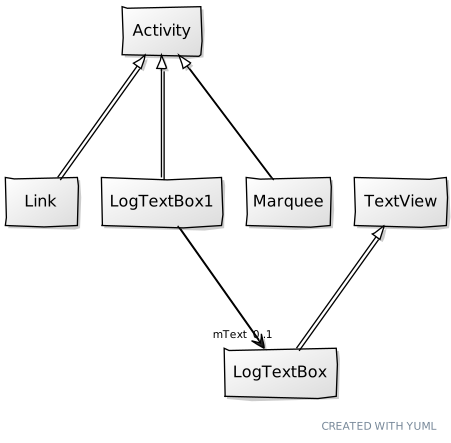
Additionally I found yumlec because I already thought about creating something like this my own. Sweet.
Here is an example of that it can do:
2011-03-10
TDD and Android
I really like TDD and I really love Android but in the past I had some trouble bringing both together.
While Android has nice support for running unit tests on device (or emulator) this isn't really an option for doing TDD since the turnaround times are quite too high. And it's also no fun for the CI server to bring up emulator instances on every build.
Now I stumbled upon Robolectric. I haven't had a chance to give it a try but if it's half as nice as it seems then it's really everything I ever dreamed of. (in terms of Android TDD developement ...)
I'm very curious and keen to give it a try.
2011-02-24
Android's Main Thread
Android's main thread is the the most important thread for your Android app. Not only the UI stuff is done on the main thread but also your services and much more is running on the main thread.
It's really important not to block the main thread longer than it's absolutely needed. It's always a good idea to not access the network and the filesystem on the main thread. Because of that the nice guys at Google brought us the StrictMode in Android 2.3 to see if your app does IO on the main thread.
But it's also a bad idea to do anything else that is time consuming on the main thread e.g. when handling the onClick of a button or something similar. You can easily spot those long running tasks on the main thread by using the following code. You should run it as early as possible in your application (Application#onCreate is a good place) and you should consider removing it from release builds:
Looper.getMainLooper().
long time = -1;
String info = null;
@Override
public void println(String line) {
if(line.startsWith(">>>")) {
time = System.currentTimeMillis();
info = line;
} else {
long now = System.currentTimeMillis();
if(now-time>500) {
Log.d(TAG,"!!!!!!!!!!!! Too slow:"+info);
}
}
}
});
With this code you will see a log entry every time you are doing anything on the main thread that takes more than 500 miliseconds. One nice thing about this approach is that it doesn't need one of the newer Android versions (all it uses is API Level 1!).
Subscribe to:
Posts (Atom)

 Posts

